
The Problem:
Recently we worked with a client having issues with servers being unable to enroll for certificates. Users logged onto the servers could enroll successfully, however both autoenroll and manual enrollment for the servers were unsuccessful.
Troubleshooting the Issue:
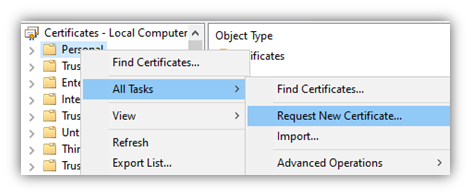
The first test was to attempt a manual enrollment via CertLM.msc. We launched CertLM in an Administrative PowerShell window. After right-clicking on the Personal store, All Tasks, Request New Certificate…
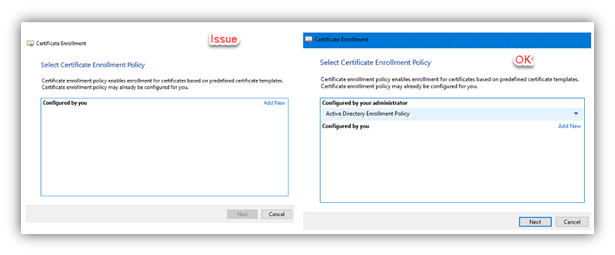
After selecting Next on the initial enrollment process, the second window shows the available enrollment policy. Most times, at a minimum the Active directory enrollment policy will be shown.
The Cause:
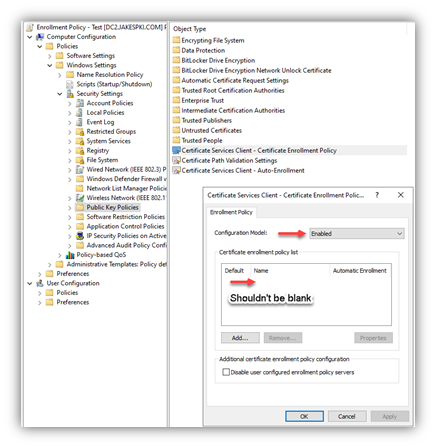
The issue is the result of a group policy setting that was updated, removing the policy but left enabled. This will result in no policy being available and stopping all enrollments.
The Resolution:
To resolve the issue permanently, identify the group policy with the incorrect configuration and set the policy to Not Configured. To temporarily validate if the setting is the issue, from regedit look at the value: ComputerHKEY_LOCAL_MACHINESOFTWAREPoliciesMicrosoftCryptography If you see “Policy Servers” it represents a group policy applying an enrollment policy setting.
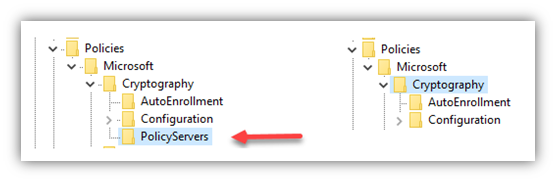
The “PolicyServers” key can be manually removed, which will allow for temporary enrollment for certificates. When group policy is applied at next refresh it will be added back and enrollment will no longer work.